Fanning and spread
Spreading one value across a selection, plus wings, blocks and randomise.
Fanning takes one value and spreads it across the selection, so five fixtures pointing at the same spot become a five-finger comb, or a row of identical intensities becomes a ramp.
It works on any attribute, not just pan and tilt: intensity, zoom, colour components, gobo rotation - anything with a number.
The command
<attribute> <centre> FAN <width> [RANDOM] [DIRECTION <NORMAL|REVERSE|IN|OUT>]
                                 [WINGS <n>] [BLOCKS <n>] [GLOBAL]
<centre> is the value the middle of the selection gets; <width> is the
total span across the selection, so the ends land half a width either side.
1 THRU 5
PAN 0 FAN 40
gives, in selection order:
-20° -10° 0° +10° +20°
Direction
With the same five fixtures and PAN 0 FAN 40:
DIRECTION | Result |
|---|---|
NORMAL (default) | −20, −10, 0, +10, +20 |
REVERSE | +20, +10, 0, −10, −20 |
IN | +20, 0, −20, 0, +20 |
OUT | −20, 0, +20, 0, −20 |
NORMAL and REVERSE are ramps; IN and OUT are symmetrical about the
middle of the selection - use them when the rig itself is symmetrical and you
want a mirrored look rather than a sweep.
Wings and blocks
Two modifiers that change which fixture sits where along the spread. They
are the same layout rule effects use, so WINGS 2 means the same thing in a fan
and in an effect.
WINGS <n> splits the selection into n mirrored sections. Wing 1 runs the
spread forwards, wing 2 runs it backwards, and so on - the classic symmetrical
rig fan, from a single command, however many fixtures are in each half.
1 THRU 12
TILT -20 FAN 30 WINGS 2
BLOCKS <n> buddies adjacent fixtures together, so each block of n
shares one value. A twelve-fixture bar with BLOCKS 3 fans as four positions of
three lamps each.
1 THRU 12
INTENSITY 50 FAN 60 BLOCKS 3
They combine: WINGS 2 BLOCKS 3 gives two mirrored halves of blocked triples.
Random
RANDOM scatters the fixtures along the spread instead of stepping them in
order. The scatter is seeded and repeatable - the same command on the same
selection gives the same scatter, so a look you like can be stored and recalled.
INTENSITY 60 FAN 80 RANDOM
The fan panel
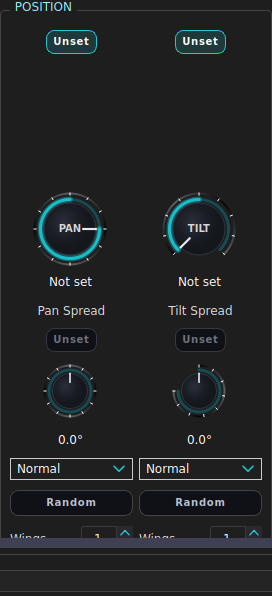
Under the pan/tilt controls in the programmer, in the Basic bank:
| Control | Command it sends |
|---|---|
| Spread spinbox | PAN <centre> FAN <spread> … |
| Direction combo | DIRECTION Normal|Reverse|In|Out |
| Random toggle | RANDOM |
| Wings spinbox | WINGS <n> |
| Blocks spinbox | BLOCKS <n> |
| Fan Global toggle | GLOBAL - see below |
Tilt has its own set of the same controls. Changing any of them re-sends the whole fan, so the panel always describes one coherent state rather than a pile of increments.
Fan Global
Without it, a fan applied while several groups are selected fans within each group: two groups of six give two six-wide fans. Fan Global treats the whole selection as one line, so the same twelve fixtures give one twelve-wide fan across both groups.
Fans are stored as intent, not as numbers
When a fan is stored into a preset or a cue with a group selected, what gets recorded is the group’s centre value plus the fan intent - spread, direction, wings, blocks - not the twelve angles it produced. Recall re-expands it against the group’s membership at that moment.
That is why a generated or hand-programmed position look still fans correctly after you add two fixtures to the group. It also means the centre value has to live in the group value itself; the merge re-centres on it.
Fans stored against individual fixtures are just values, because there is no group to re-expand against.
Seeing a fan
SHOW PROGRAMMER
prints fanned capabilities as a FAN spread=… dir=… random=… line rather than
as a list of numbers, so you can see the intent that produced them.
See also
The programmer · Selecting fixtures · Effects (SFX) · Presets