Presets
Whole looks stored against fixtures and groups, recalled at any level.
Presets store reusable fixture and group looks (for example position, colour, beam, focus). They let you maintain consistency and make global updates safer because cues can keep live references back to the stored preset.
Preset content
LMX presets store concrete capability values per fixture and, when group record mode is reference, per group. A preset can contain any capability type that exists in the programmer, including intensity, colour, position, beam, focus, and other fixture-specific capabilities.
In the GUI
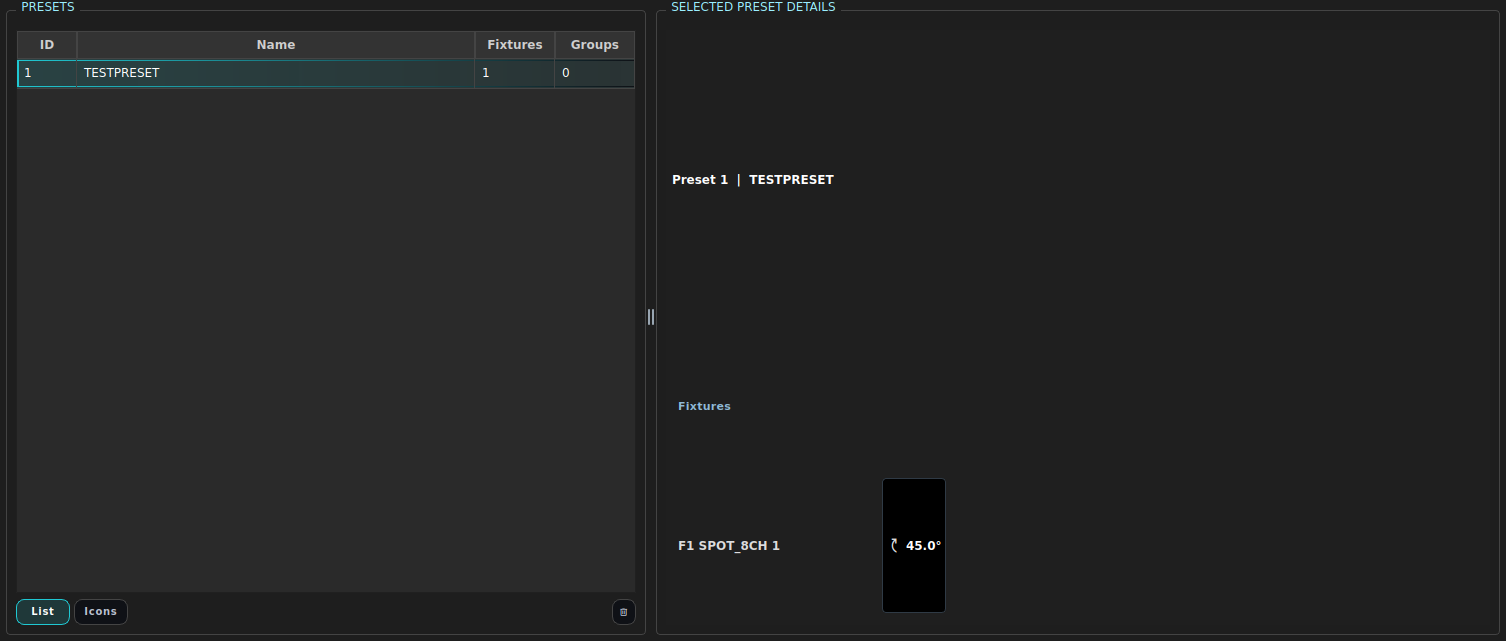
Presets live on the Presets tab. The list on the left holds your presets; the detail panel on the right shows and edits the selected preset’s stored values.
Store a preset
Set your fixtures/groups and values in the programmer, then click Presets… and pick Save selected. The preset captures the current programmer contents.

Equivalent command:
STORE PRESET <n> "Label".
| In the GUI | What it does | Equivalent command |
|---|---|---|
| Click a preset row | Recall it onto the current selection | PRESET <n> |
| Presets… → Apply full look | Recall onto its original stored fixtures/groups | PRESET <n> ALL |
| Edit a capability chip in the detail panel | Change a stored value | UPDATE PRESET <n> … REPLACE |
| Trash button | Delete the selected preset | DELETE PRESET <n> |
CLI commands
LIST PRESETS
SHOW PRESET 11
STORE PRESET 11 "Lead Vocal Spot"
STORE PRESET 11 NAME "Lead Vocal Spot" MERGE
STORE PRESET 11 OUTPUT                  # snapshot the live merged output
PRESET 11
PRESET "Lead Vocal Spot"
PRESET 11 ALL                           # recall onto its stored fixtures/groups
PRESET 11 AMOUNT 50                     # partial recall (blended at 50%)
UNAPPLY PRESET 11 [ALL]                 # remove its contribution again
UPDATE PRESET 11 NAME "Lead Vocal Warm"
UPDATE PRESET 11 FIXTURE 3 DIMMER 80 PAN 45 TILT 30 REPLACE
UPDATE PRESET 11 GROUP 2 RED 100 GREEN 40 BLUE 20 MERGE
DELETE PRESET 11
DELETE PRESET 11 FORCE
REPLACE is the default update mode and removes attributes no longer present in the preset, pruning stale linked cue/programmer references. MERGE updates or adds values while keeping existing stored attributes.
DELETE PRESET <id> refuses to remove an in-use preset. Add FORCE to materialise linked preset values as explicit values before deleting the preset.
Example
GROUP 2
PAN 50
TILT 35
RED 80
GREEN 40
BLUE 20
STORE PRESET 21 "Band centre"
Later:
GROUP 2
PRESET 21
STORE CUE 15 "Band key look"
Global tweak:
UPDATE PRESET 21 GROUP 2 PAN 55 TILT 32 RED 90 GREEN 35 BLUE 15 REPLACE
Operator guidance
- Use presets for values that recur across many cues.
- Prefer updating presets rather than hand-editing dozens of cues.
- Use
MERGEwhen adding one more attribute to a mature preset. - Use
REPLACEwhen the preset should exactly match the current programmer or explicit command payload. - Document purpose in preset labels; avoid vague names such as
look1.
Failure modes
- Preset appears partial: not all fixtures/capabilities were set before storage, or
REPLACEremoved attributes. - Preset not visible in output: a higher-priority layer (programmer/executor) may currently override it.
- Delete refused: the preset is referenced by cues or faders; use
DELETE PRESET <id> FORCEonly when you want to materialise those links.
Stacked palette contributions and blending
Each time you apply a palette to the programmer, LMX records the palette id, its resolved value, and the amount (0–100 %, default 100) alongside the numeric result. Applying a second different palette to the same attribute stacks alongside the first rather than replacing it. Re-applying the same palette id updates its contribution in place.
When two or more palettes are stacked on a fadeable capability (intensity, colour channels, pan, tilt, focus, zoom, …), the final value is computed by a weighted-average blend:
weighted_target = Σ(valueᵢ × amountᵢ) / Σ(amountᵢ)
blend_alpha     = min(1.0, Σ(amountᵢ))
result          = base + (weighted_target − base) × blend_alpha
base is what the programmer inherited from cue/fader playback (commonly 0).
Example - Palette 1 (red=20, amount=100%) + Palette 2 (red=80, amount=50%):
weighted_target = (20×1.0 + 80×0.5) / 1.5 = 40
blend_alpha     = min(1.0, 1.5) = 1.0
result          = 40          (base fully displaced because Σ≥100%)
For slot / non-fadeable capabilities (gobos, colour-wheel positions) the
result cannot be interpolated: the palette applied latest whose
amount > 0 wins. Amount is a pure on/off gate here, not a weight.
A raw manual edit (typing a value directly) clears the entire stack for
that attribute. UNAPPLY PALETTE <id> removes one entry without disturbing the
rest:
PALETTE 1 AMOUNT 100   # P1 stacked
PALETTE 2 AMOUNT 50    # P2 stacked alongside
UNAPPLY PALETTE 1      # remove P1; P2 remains
SHOW PROG prints each contribution and its amount when two or more palettes
are stacked. INSPECT FIXTURE <id> CAP <cap> shows the full blend trace.
See Palettes for the complete palette command set and additional worked examples.
Preset capture and palette live-tracking
When you store a preset from the programmer, palette-sourced contributions stay live: the stored entry still points at the palette by id and tracks future palette edits. A multi-palette stack captured from the programmer survives intact into the preset.
Preset-sourced contributions are flattened at capture time: if a value in the programmer arrived from recalling another preset, the nested preset id is dropped and only the numeric value and amount are kept. This means presets cannot nest other presets, but can hold arbitrarily many live palette references.
SFX in presets
A preset captures any SFX running in the programmer (its targets and amount) at store time, and recreates them when the preset is recalled:
GROUP 3 ; APPLY SFX 5 AMOUNT 80
STORE PRESET 10        # the effect is stored alongside the values
PRESET 10              # recall - the effect runs again, retargeted to selection
UNAPPLY PRESET 10      # values and the recalled effect both go
UNAPPLY PRESET (and PRESET <id> AMOUNT 0) stops those recalled effects over
the same scope as the values: without ALL, only on the selected fixtures, so
an application the preset also placed elsewhere keeps running there; with
ALL, everywhere. Programmer instances of the preset’s SFX templates are what
it stops - recalling the preset onto a fixture that already runs that template
replaces the running application rather than stacking a second one, so there is
no separate “which apply started this” to distinguish. An APPLY SFX of a
template the preset does not carry is untouched.
See Effects (SFX) for the full SFX command set.